
Kanallar
Qpien'deki kanalları tanıyın
Mesajlaşma uygulamalarınızı, e-ticaret mağazalarınızı, pazar yerlerinizi ve CRM'lerinizi Qpien'e nasıl bağlayabileceğinizi keşfedin ve tüm müşteri etkileşimlerinizi tek bir çalışma alanından yönetin.
Qpien, çok kanallı (omnichannel) bir iletişim platformudur. Çeşitli iletişim kanallarınızı Qpien'e bağlayarak, tüm müşteri etkileşimlerini Akıllı Gelen Kutunuza yönlendirirsiniz. Bu sayede müşteri sorularını yanıtlamak, siparişleri yönetmek veya pazaryeri incelemelerini takip etmek için farklı tarayıcı sekmeleri veya mobil uygulamalar arasında geçiş yapma ihtiyacı ortadan kalkar.
Bu makalede:
Canlı Destek (Live Chat)
E-posta
Telefon
WhatsApp
Telegram
Sosyal Medya
Pazaryerleri
E-ticaret
CRM
Qpien Canlı Destek (Live Chat)
Qpien'in yerleşik Canlı Destek aracı, web sitesi ziyaretçilerinizle gerçek zamanlı olarak bağlantı kurmanıza, soruları anında yanıtlamanıza ve en çok ihtiyaç duyulan anlarda proaktif destek sunmanıza yardımcı olur. Sohbetler doğrudan ortak gelen kutunuzda görünür; bu da ekiplerin işbirliği yapmasını ve sorunları hızla çözmesini kolaylaştırır.
Kişiselleştirilmiş destek sunun, ürün bağlantıları veya görselleri paylaşın ve sohbetleri doğru temsilcilere yönlendirin; üstelik hepsini tek bir platformdan yapın. İster satış öncesi destek ister satış sonrası hizmet olsun, Canlı Destek etkileşimi artırmanıza ve müşteri memnuniyetini zahmetsizce yükseltmenize yardımcı olur.
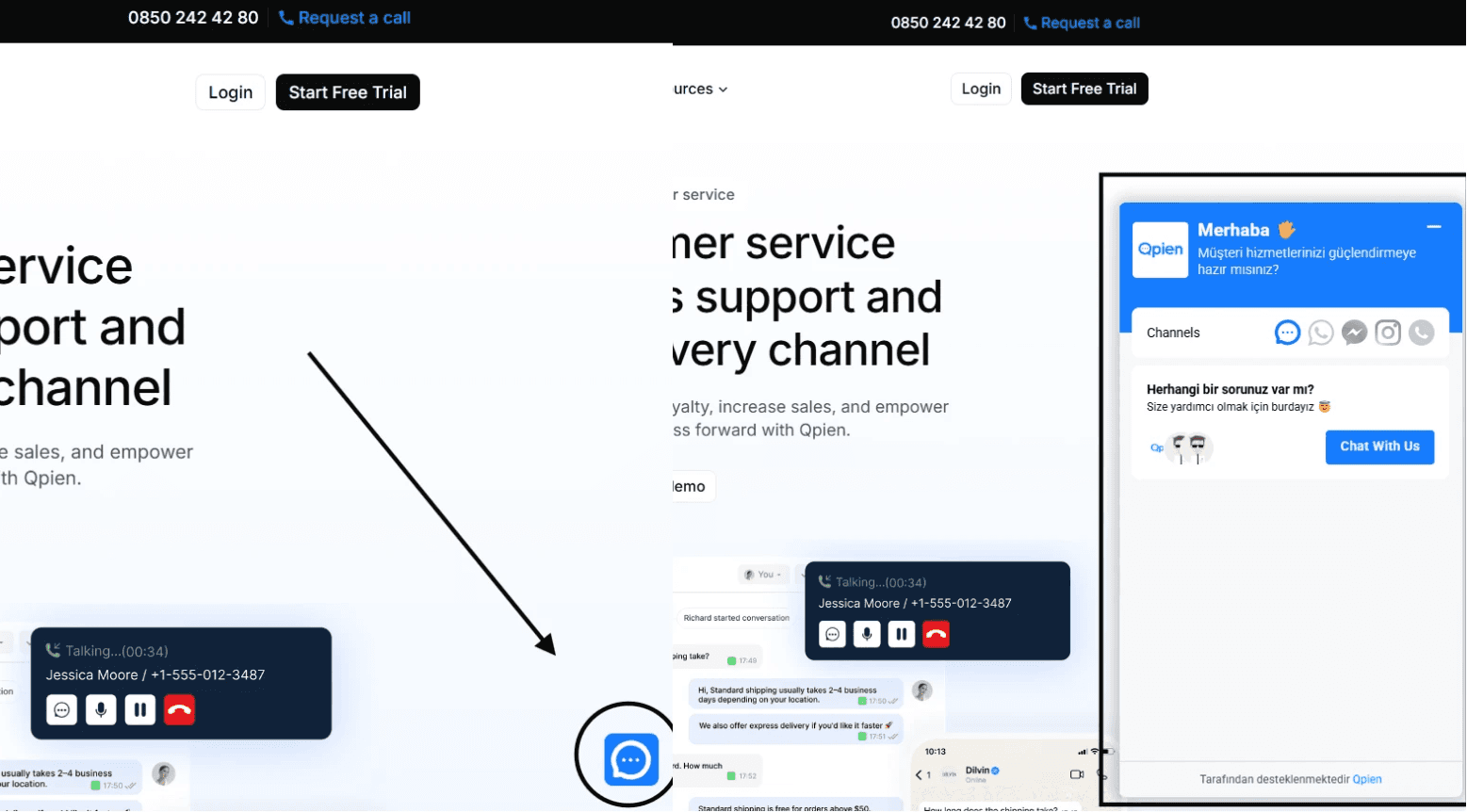
Eklentiyi (widget) eklemeye hazır mısınız? Kurulumun nasıl yapılacağını [Canlı Destek Entegrasyon Rehberi]'mizden öğrenebilirsiniz.
E-posta
Geleneksel destek kanallarınızı merkezileştirin. Şirketinizin destek e-postalarını (ör. destek@sirketiniz.com) Qpien'e yönlendirerek, ekibinizin tüm e-posta taleplerini doğrudan ortak çalışma alanından yönetmesini ve yanıtlamasını sağlayabilirsiniz.
Tüm e-postaları birleşik gelen kutunuzda toplayın. Qpien'in e-posta entegrasyonu ile müşteri e-postalarını tıpkı bir sohbet mesajı gibi hızlı, düzenli ve tamamen izlenebilir bir şekilde yanıtlayabilirsiniz. E-postaları temsilcilere atayın, SLA (Hizmet Seviyesi Sözleşmesi) süreçlerini yönetin ve destek kanalları arasındaki bağlamı koruyun.
Gelen kutunuzu bağlamak mı istiyorsunuz? [E-posta Entegrasyon Rehberi]'mizdeki adımları izleyin.
Telefon
Qpien Çağrı Merkezi, ekibinizin ortak gelen kutusundan ayrılmadan telefon görüşmeleri yapmasına ve almasına olanak tanır. Daha hızlı ve kişiselleştirilmiş destek sunmak için müşteri profillerini, görüşme geçmişini ve ilgili talepleri (ticket) gerçek zamanlı olarak görüntüleyin.
Çağrıları atayın, IVR (Sesli Yanıt Sistemi) akışları kurun, kalite güvencesi için görüşmeleri kaydedin ve kusursuz bir sesli destek deneyimi sağlayın; hepsi tek bir platformda.
Arama yapmaya hazır mısınız? Numaralarınızı nasıl ayarlayacağınızı [Telefon Entegrasyon Rehberi]'mizden keşfedin.
Müşterilerinizle en aktif oldukları platformda iletişim kurun. Qpien'in WhatsApp entegrasyonu ile tüm WhatsApp mesajlarını, canlı destek, e-posta ve diğer kanallarla birlikte doğrudan ortak gelen kutunuzdan yönetebilirsiniz. Zengin medya dosyaları gönderip alın, görüşmeleri ekip arkadaşlarınıza atayın ve daha hızlı destek için yanıtları otomatikleştirin.
Anında destek sağlamak, sipariş onayları veya hatırlatmalar gibi proaktif güncellemeler göndermek ve gerçek zamanlı, kişiselleştirilmiş iletişim yoluyla daha güçlü ilişkiler kurmak için WhatsApp'ı kullanın. Bu, müşterilerinizle zaten bulundukları yerde buluşmanın en kolay yoludur.
WhatsApp'ı bağlamak mı istiyorsunuz? Gerekli tüm adımları [WhatsApp Entegrasyon Rehberi]'mizde bulabilirsiniz.
Telegram
Şifreli ve anlık iletişime önem veren müşterilerinizi destekleyin. Qpien'in Telegram entegrasyonu sayesinde, Telegram mesajlarını tıpkı diğer kanallarda olduğu gibi ortak gelen kutunuzda alıp yanıtlayabilirsiniz. Sohbetleri atayın, otomatik yanıtlar belirleyin ve müşteri yolculuğu boyunca görüşme geçmişini takip edin.
Telegram'ı çok kanallı stratejinizin bir parçası yapın ve müşterilere yardım almaları için güvenilir ve verimli bir yol sunun.
Telegram mı kullanıyorsunuz? Botunuzu nasıl bağlayacağınızı [Telegram Entegrasyon Rehberi]'mizden öğrenin.
Sosyal Medya
Markanızın sosyal medyadaki varlığını sorunsuz bir şekilde yönetin. Hesaplarınızı bağlayarak Instagram, Facebook ve TikTok'tan gelen doğrudan mesajları (DM), yorumları ve hikaye yanıtlarını ayrı uygulamaları açmadan yanıtlayın.
Sosyal medya hesaplarınızı bağlamak mı istiyorsunuz? [Sosyal Medya Entegrasyon Rehberleri]'mize göz atın.
Pazaryerleri (Marketplaces)
Pazaryeri iletişimlerinizi merkezileştirin. Müşteri sorularını yanıtlamak ve değerlendirmeleri tek bir panelden yönetmek için Trendyol, Hepsiburada, Pazarama, Amazon, eBay, Kaufland, Walmart ve n11 satıcı hesaplarınızı platforma bağlayın.
Birden fazla platformda satış mı yapıyorsunuz? Bunları nasıl bağlayacağınızı [Pazaryerleri Entegrasyon Rehberleri]'mizden öğrenin.
E-ticaret
Destek ekibinizi bir satış motoruna dönüştürün. Qpien Shop, Shopify, Ticimax, İkas, Faprika, T-Soft ve Ideasoft gibi platformları entegre ederek, temsilcilerinizin aktif sohbetin hemen yanında müşteri sipariş geçmişlerini ve sepet içeriklerini görüntülemesini sağlayın.
Bir online mağaza mı yönetiyorsunuz? [E-ticaret Entegrasyon Rehberleri]'mizi kullanarak verilerinizi senkronize edin.
CRM
İş verilerinizi tüm departmanlarda senkronize tutun. Zoho CRM gibi Müşteri İlişkileri Yönetimi araçlarınızı bağlamak, satış ve destek ekiplerinizin her zaman en güncel müşteri profillerine sahip olmasını sağlar.
Müşteri verilerini senkronize etmeniz mi gerekiyor? Kurulum talimatlarını [CRM Entegrasyon Rehberi]'mizde bulabilirsini
Qpien, çok kanallı (omnichannel) bir iletişim platformudur. Çeşitli iletişim kanallarınızı Qpien'e bağlayarak, tüm müşteri etkileşimlerini Akıllı Gelen Kutunuza yönlendirirsiniz. Bu sayede müşteri sorularını yanıtlamak, siparişleri yönetmek veya pazaryeri incelemelerini takip etmek için farklı tarayıcı sekmeleri veya mobil uygulamalar arasında geçiş yapma ihtiyacı ortadan kalkar.
Bu makalede:
Canlı Destek (Live Chat)
E-posta
Telefon
WhatsApp
Telegram
Sosyal Medya
Pazaryerleri
E-ticaret
CRM
Qpien Canlı Destek (Live Chat)
Qpien'in yerleşik Canlı Destek aracı, web sitesi ziyaretçilerinizle gerçek zamanlı olarak bağlantı kurmanıza, soruları anında yanıtlamanıza ve en çok ihtiyaç duyulan anlarda proaktif destek sunmanıza yardımcı olur. Sohbetler doğrudan ortak gelen kutunuzda görünür; bu da ekiplerin işbirliği yapmasını ve sorunları hızla çözmesini kolaylaştırır.
Kişiselleştirilmiş destek sunun, ürün bağlantıları veya görselleri paylaşın ve sohbetleri doğru temsilcilere yönlendirin; üstelik hepsini tek bir platformdan yapın. İster satış öncesi destek ister satış sonrası hizmet olsun, Canlı Destek etkileşimi artırmanıza ve müşteri memnuniyetini zahmetsizce yükseltmenize yardımcı olur.
Eklentiyi (widget) eklemeye hazır mısınız? Kurulumun nasıl yapılacağını [Canlı Destek Entegrasyon Rehberi]'mizden öğrenebilirsiniz.
E-posta
Geleneksel destek kanallarınızı merkezileştirin. Şirketinizin destek e-postalarını (ör. destek@sirketiniz.com) Qpien'e yönlendirerek, ekibinizin tüm e-posta taleplerini doğrudan ortak çalışma alanından yönetmesini ve yanıtlamasını sağlayabilirsiniz.
Tüm e-postaları birleşik gelen kutunuzda toplayın. Qpien'in e-posta entegrasyonu ile müşteri e-postalarını tıpkı bir sohbet mesajı gibi hızlı, düzenli ve tamamen izlenebilir bir şekilde yanıtlayabilirsiniz. E-postaları temsilcilere atayın, SLA (Hizmet Seviyesi Sözleşmesi) süreçlerini yönetin ve destek kanalları arasındaki bağlamı koruyun.
Gelen kutunuzu bağlamak mı istiyorsunuz? [E-posta Entegrasyon Rehberi]'mizdeki adımları izleyin.
Telefon
Qpien Çağrı Merkezi, ekibinizin ortak gelen kutusundan ayrılmadan telefon görüşmeleri yapmasına ve almasına olanak tanır. Daha hızlı ve kişiselleştirilmiş destek sunmak için müşteri profillerini, görüşme geçmişini ve ilgili talepleri (ticket) gerçek zamanlı olarak görüntüleyin.
Çağrıları atayın, IVR (Sesli Yanıt Sistemi) akışları kurun, kalite güvencesi için görüşmeleri kaydedin ve kusursuz bir sesli destek deneyimi sağlayın; hepsi tek bir platformda.
Arama yapmaya hazır mısınız? Numaralarınızı nasıl ayarlayacağınızı [Telefon Entegrasyon Rehberi]'mizden keşfedin.
Müşterilerinizle en aktif oldukları platformda iletişim kurun. Qpien'in WhatsApp entegrasyonu ile tüm WhatsApp mesajlarını, canlı destek, e-posta ve diğer kanallarla birlikte doğrudan ortak gelen kutunuzdan yönetebilirsiniz. Zengin medya dosyaları gönderip alın, görüşmeleri ekip arkadaşlarınıza atayın ve daha hızlı destek için yanıtları otomatikleştirin.
Anında destek sağlamak, sipariş onayları veya hatırlatmalar gibi proaktif güncellemeler göndermek ve gerçek zamanlı, kişiselleştirilmiş iletişim yoluyla daha güçlü ilişkiler kurmak için WhatsApp'ı kullanın. Bu, müşterilerinizle zaten bulundukları yerde buluşmanın en kolay yoludur.
WhatsApp'ı bağlamak mı istiyorsunuz? Gerekli tüm adımları [WhatsApp Entegrasyon Rehberi]'mizde bulabilirsiniz.
Telegram
Şifreli ve anlık iletişime önem veren müşterilerinizi destekleyin. Qpien'in Telegram entegrasyonu sayesinde, Telegram mesajlarını tıpkı diğer kanallarda olduğu gibi ortak gelen kutunuzda alıp yanıtlayabilirsiniz. Sohbetleri atayın, otomatik yanıtlar belirleyin ve müşteri yolculuğu boyunca görüşme geçmişini takip edin.
Telegram'ı çok kanallı stratejinizin bir parçası yapın ve müşterilere yardım almaları için güvenilir ve verimli bir yol sunun.
Telegram mı kullanıyorsunuz? Botunuzu nasıl bağlayacağınızı [Telegram Entegrasyon Rehberi]'mizden öğrenin.
Sosyal Medya
Markanızın sosyal medyadaki varlığını sorunsuz bir şekilde yönetin. Hesaplarınızı bağlayarak Instagram, Facebook ve TikTok'tan gelen doğrudan mesajları (DM), yorumları ve hikaye yanıtlarını ayrı uygulamaları açmadan yanıtlayın.
Sosyal medya hesaplarınızı bağlamak mı istiyorsunuz? [Sosyal Medya Entegrasyon Rehberleri]'mize göz atın.
Pazaryerleri (Marketplaces)
Pazaryeri iletişimlerinizi merkezileştirin. Müşteri sorularını yanıtlamak ve değerlendirmeleri tek bir panelden yönetmek için Trendyol, Hepsiburada, Pazarama, Amazon, eBay, Kaufland, Walmart ve n11 satıcı hesaplarınızı platforma bağlayın.
Birden fazla platformda satış mı yapıyorsunuz? Bunları nasıl bağlayacağınızı [Pazaryerleri Entegrasyon Rehberleri]'mizden öğrenin.
E-ticaret
Destek ekibinizi bir satış motoruna dönüştürün. Qpien Shop, Shopify, Ticimax, İkas, Faprika, T-Soft ve Ideasoft gibi platformları entegre ederek, temsilcilerinizin aktif sohbetin hemen yanında müşteri sipariş geçmişlerini ve sepet içeriklerini görüntülemesini sağlayın.
Bir online mağaza mı yönetiyorsunuz? [E-ticaret Entegrasyon Rehberleri]'mizi kullanarak verilerinizi senkronize edin.
CRM
İş verilerinizi tüm departmanlarda senkronize tutun. Zoho CRM gibi Müşteri İlişkileri Yönetimi araçlarınızı bağlamak, satış ve destek ekiplerinizin her zaman en güncel müşteri profillerine sahip olmasını sağlar.
Müşteri verilerini senkronize etmeniz mi gerekiyor? Kurulum talimatlarını [CRM Entegrasyon Rehberi]'mizde bulabilirsini
Qpien, çok kanallı (omnichannel) bir iletişim platformudur. Çeşitli iletişim kanallarınızı Qpien'e bağlayarak, tüm müşteri etkileşimlerini Akıllı Gelen Kutunuza yönlendirirsiniz. Bu sayede müşteri sorularını yanıtlamak, siparişleri yönetmek veya pazaryeri incelemelerini takip etmek için farklı tarayıcı sekmeleri veya mobil uygulamalar arasında geçiş yapma ihtiyacı ortadan kalkar.
Bu makalede:
Canlı Destek (Live Chat)
E-posta
Telefon
WhatsApp
Telegram
Sosyal Medya
Pazaryerleri
E-ticaret
CRM
Qpien Canlı Destek (Live Chat)
Qpien'in yerleşik Canlı Destek aracı, web sitesi ziyaretçilerinizle gerçek zamanlı olarak bağlantı kurmanıza, soruları anında yanıtlamanıza ve en çok ihtiyaç duyulan anlarda proaktif destek sunmanıza yardımcı olur. Sohbetler doğrudan ortak gelen kutunuzda görünür; bu da ekiplerin işbirliği yapmasını ve sorunları hızla çözmesini kolaylaştırır.
Kişiselleştirilmiş destek sunun, ürün bağlantıları veya görselleri paylaşın ve sohbetleri doğru temsilcilere yönlendirin; üstelik hepsini tek bir platformdan yapın. İster satış öncesi destek ister satış sonrası hizmet olsun, Canlı Destek etkileşimi artırmanıza ve müşteri memnuniyetini zahmetsizce yükseltmenize yardımcı olur.
Eklentiyi (widget) eklemeye hazır mısınız? Kurulumun nasıl yapılacağını [Canlı Destek Entegrasyon Rehberi]'mizden öğrenebilirsiniz.
E-posta
Geleneksel destek kanallarınızı merkezileştirin. Şirketinizin destek e-postalarını (ör. destek@sirketiniz.com) Qpien'e yönlendirerek, ekibinizin tüm e-posta taleplerini doğrudan ortak çalışma alanından yönetmesini ve yanıtlamasını sağlayabilirsiniz.
Tüm e-postaları birleşik gelen kutunuzda toplayın. Qpien'in e-posta entegrasyonu ile müşteri e-postalarını tıpkı bir sohbet mesajı gibi hızlı, düzenli ve tamamen izlenebilir bir şekilde yanıtlayabilirsiniz. E-postaları temsilcilere atayın, SLA (Hizmet Seviyesi Sözleşmesi) süreçlerini yönetin ve destek kanalları arasındaki bağlamı koruyun.
Gelen kutunuzu bağlamak mı istiyorsunuz? [E-posta Entegrasyon Rehberi]'mizdeki adımları izleyin.
Telefon
Qpien Çağrı Merkezi, ekibinizin ortak gelen kutusundan ayrılmadan telefon görüşmeleri yapmasına ve almasına olanak tanır. Daha hızlı ve kişiselleştirilmiş destek sunmak için müşteri profillerini, görüşme geçmişini ve ilgili talepleri (ticket) gerçek zamanlı olarak görüntüleyin.
Çağrıları atayın, IVR (Sesli Yanıt Sistemi) akışları kurun, kalite güvencesi için görüşmeleri kaydedin ve kusursuz bir sesli destek deneyimi sağlayın; hepsi tek bir platformda.
Arama yapmaya hazır mısınız? Numaralarınızı nasıl ayarlayacağınızı [Telefon Entegrasyon Rehberi]'mizden keşfedin.
Müşterilerinizle en aktif oldukları platformda iletişim kurun. Qpien'in WhatsApp entegrasyonu ile tüm WhatsApp mesajlarını, canlı destek, e-posta ve diğer kanallarla birlikte doğrudan ortak gelen kutunuzdan yönetebilirsiniz. Zengin medya dosyaları gönderip alın, görüşmeleri ekip arkadaşlarınıza atayın ve daha hızlı destek için yanıtları otomatikleştirin.
Anında destek sağlamak, sipariş onayları veya hatırlatmalar gibi proaktif güncellemeler göndermek ve gerçek zamanlı, kişiselleştirilmiş iletişim yoluyla daha güçlü ilişkiler kurmak için WhatsApp'ı kullanın. Bu, müşterilerinizle zaten bulundukları yerde buluşmanın en kolay yoludur.
WhatsApp'ı bağlamak mı istiyorsunuz? Gerekli tüm adımları [WhatsApp Entegrasyon Rehberi]'mizde bulabilirsiniz.
Telegram
Şifreli ve anlık iletişime önem veren müşterilerinizi destekleyin. Qpien'in Telegram entegrasyonu sayesinde, Telegram mesajlarını tıpkı diğer kanallarda olduğu gibi ortak gelen kutunuzda alıp yanıtlayabilirsiniz. Sohbetleri atayın, otomatik yanıtlar belirleyin ve müşteri yolculuğu boyunca görüşme geçmişini takip edin.
Telegram'ı çok kanallı stratejinizin bir parçası yapın ve müşterilere yardım almaları için güvenilir ve verimli bir yol sunun.
Telegram mı kullanıyorsunuz? Botunuzu nasıl bağlayacağınızı [Telegram Entegrasyon Rehberi]'mizden öğrenin.
Sosyal Medya
Markanızın sosyal medyadaki varlığını sorunsuz bir şekilde yönetin. Hesaplarınızı bağlayarak Instagram, Facebook ve TikTok'tan gelen doğrudan mesajları (DM), yorumları ve hikaye yanıtlarını ayrı uygulamaları açmadan yanıtlayın.
Sosyal medya hesaplarınızı bağlamak mı istiyorsunuz? [Sosyal Medya Entegrasyon Rehberleri]'mize göz atın.
Pazaryerleri (Marketplaces)
Pazaryeri iletişimlerinizi merkezileştirin. Müşteri sorularını yanıtlamak ve değerlendirmeleri tek bir panelden yönetmek için Trendyol, Hepsiburada, Pazarama, Amazon, eBay, Kaufland, Walmart ve n11 satıcı hesaplarınızı platforma bağlayın.
Birden fazla platformda satış mı yapıyorsunuz? Bunları nasıl bağlayacağınızı [Pazaryerleri Entegrasyon Rehberleri]'mizden öğrenin.
E-ticaret
Destek ekibinizi bir satış motoruna dönüştürün. Qpien Shop, Shopify, Ticimax, İkas, Faprika, T-Soft ve Ideasoft gibi platformları entegre ederek, temsilcilerinizin aktif sohbetin hemen yanında müşteri sipariş geçmişlerini ve sepet içeriklerini görüntülemesini sağlayın.
Bir online mağaza mı yönetiyorsunuz? [E-ticaret Entegrasyon Rehberleri]'mizi kullanarak verilerinizi senkronize edin.
CRM
İş verilerinizi tüm departmanlarda senkronize tutun. Zoho CRM gibi Müşteri İlişkileri Yönetimi araçlarınızı bağlamak, satış ve destek ekiplerinizin her zaman en güncel müşteri profillerine sahip olmasını sağlar.
Müşteri verilerini senkronize etmeniz mi gerekiyor? Kurulum talimatlarını [CRM Entegrasyon Rehberi]'mizde bulabilirsini
Önceki
Telefon kanalını tanıyın
Sonraki
Sonraki
Kişiler
Qpien'i 14 gün ücretsiz deneyin! 🎉
Tüm destek kanallarınızı yönetmeye hazır mısınız?
Qpien ile müşteri etkileşimlerinizi güçlendirin! Her konuşmada satışları artırın ve memnuniyeti yükseltin.
Qpien'i 14 gün ücretsiz deneyin! 🎉
Tüm destek kanallarınızı yönetmeye hazır mısınız?
Qpien ile müşteri etkileşimlerinizi güçlendirin! Her konuşmada satışları artırın ve memnuniyeti yükseltin.
Qpien'i 14 gün ücretsiz deneyin! 🎉
Tüm destek kanallarınızı yönetmeye hazır mısınız?
Qpien ile müşteri etkileşimlerinizi güçlendirin! Her konuşmada satışları artırın ve memnuniyeti yükseltin.